
PAI-Field + Typed guardrails
In development
Measure the distance. Don't guess it.
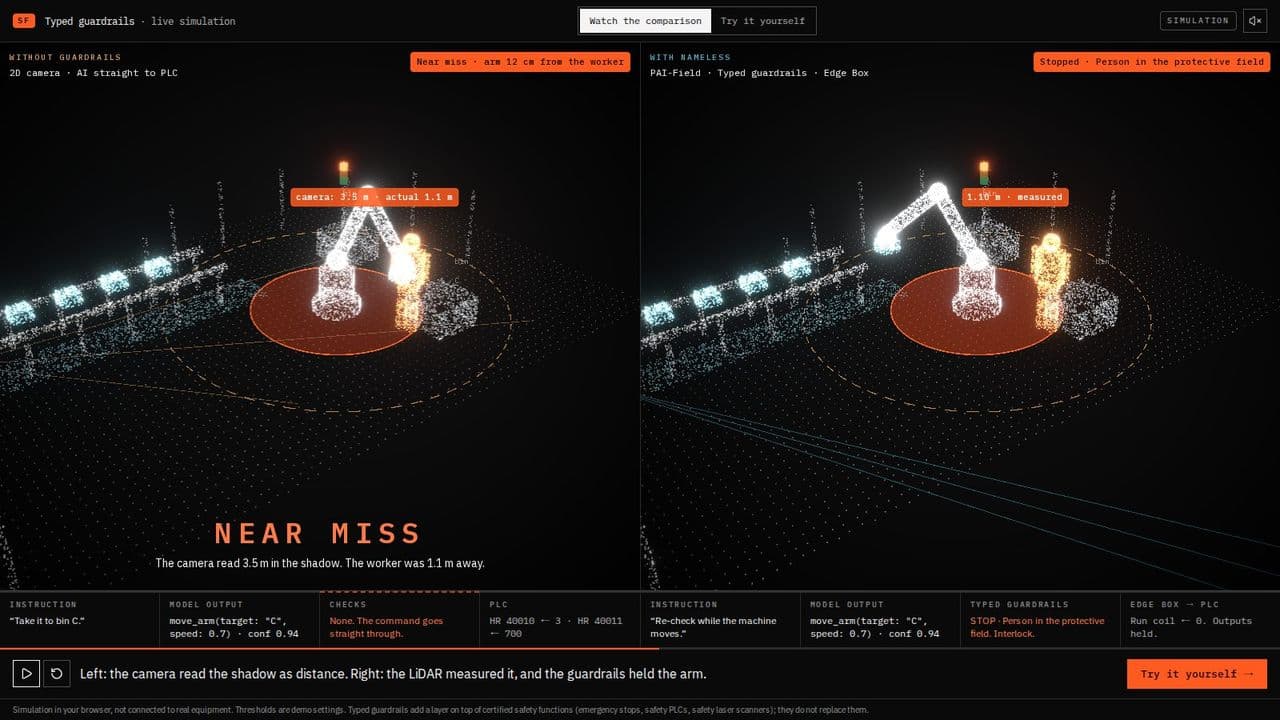
PAI-Field measures how far every person is from the machine with 3D LiDAR, ten times a second, independently of the AI's own camera. Typed guardrails use that measurement to decide whether each AI command may run, and check again every 100 ms while the machine moves.
01
3D LiDAR ×2–4
Mounted high in the corners of the cell, looking down, so the machine never hides a person from all of them.
02
PAI-Field
Removes the empty cell and the machine itself from the point cloud, and measures what is left.
03
Typed guardrails
Eight checks on every command and on the running command every 100 ms: allow, slow, stop or reject.
04
Edge Box
Writes only what passed. Stops the outputs if guardrails go quiet.
Why LiDAR, and what it does not replace
| 2D camera (the AI's eyes) | Safety laser scanner | PAI-Field | |
|---|---|---|---|
| Distance | Estimated from pixels. Shadows, glare and dust throw it off | Measured | Measured (time of flight) |
| Coverage | Field of view | One horizontal plane | The whole volume: crouching, reaching, climbing |
| Certified for safety | No | Yes (IEC 61496, ISO 13849) | No |
| Job | Plan the work | The safety function | Decide which AI commands may run |
Keep your safety laser scanner. PAI-Field sits on top of it. Point clouds carry no faces, so workers are not identified, which matters when you explain the system to the people on the floor.
What happens to every scan
Every 100 ms, for every sensor. Design target: under 50 ms from scan to distance.
- 01ReceiveEach LiDAR's points, timestamped. All sensors share one clock over PTP (IEEE 1588).
- 02AlignTransform into one cell coordinate frame, using the mounting positions found at commissioning.
- 03CropKeep only the monitored volume: the cell and the space around it.
- 04Subtract the empty cellCompare with the background recorded when the cell was empty. Keep only what was not there.
- 05Subtract the machineBuild the arm's current shape from its joint angles and remove those points.
- 06GroupCluster nearby points. Ignore clusters too small or too low to be a person.
- 07MeasureShortest distance from each cluster to the machine's hazard zone: the arm as it is now, plus where the current command is taking it.
- 08PublishSend the nearest distance, its timestamp and sensor health to Typed guardrails.
Anything unexpected counts as a person
PAI-Field does not need to recognize a person to stop for one. Any cluster that is not part of the empty cell or the machine is treated as a person: a worker, a cart, a box someone left behind. A classifier may label things for the dashboard, but it is never on the path that decides whether the machine stops. The same scan always gives the same distance.
What Typed guardrails receive
{
  "cell": "line-3",
  "captured_at_ms": 1760000000123,
  "nearest_person_m": 1.42,
  "objects": [{ "id": 7, "distance_m": 1.42, "height_m": 1.71, "points": 412 }],
  "health": { "sensors_ok": 3, "sensors_total": 3, "blocked": [], "drift_mm": 4 }
}
If any sensor is unhealthy, nearest_person_m is left out. No distance means stop. PAI-Field never assumes the remaining sensors can see everything.
When a sensor can't be trusted
Every case below withholds the distance, so the cell stops. A person checks the sensor before an operator reset.
| What happens | How PAI-Field notices |
|---|---|
| Cable cut or power lost | No scan for 200 ms |
| Window dirty or covered | Too few returns from surfaces that should be visible in the background |
| Sensor knocked out of place | Reference reflectors in the cell appear more than 5 cm from where they were |
| Clocks drift apart | PTP sync lost, or a scan stamped in the future |
Typed guardrails: the decision
Each AI command, and the running command every 100 ms, goes through eight checks in this order. The first one that fires decides. Same input, same decision. The demo shows each step with the value it saw.
- 01TypeKnown action, known fields, values in range. Anything else is dropped.
- 02Stop commandstop and stop_conveyor always pass.
- 03InterlockOnce stopped, nothing moves until an operator resets.
- 04ConfidenceBelow the threshold set for the cell, stop.
- 05Point cloudNo distance from PAI-Field, stop.
- 06FreshnessScan older than 200 ms, stop.
- 07Protective fieldPerson inside it, stop.
- 08Warning zonePerson inside it, cap the speed.
The allowed actions for a cell come from the Edge Box tag map, narrowed further to what the AI is allowed to do.
Sizing the zones
From a person moving to a stop command takes up to about 250 ms by design: one scan, processing, one guardrail cycle. That delay, plus the machine's own stopping time, goes into the size of the protective field, the same way ISO 13855 sizes separation distances. The 1.5 m and 3.0 m in our demo are for show. On a real cell we measure the stopping time with your safety engineer and size the zones from it.
What's in the field
Pilot systems use off-the-shelf parts. We will choose the exact models with our first design partners.
| Part | Plan | Why |
|---|---|---|
| LiDAR | Low-cost industrial 3D LiDAR, 360° horizontal, 10 Hz, IP67 class. Two to four per cell | One sensor always has a blind spot behind the machine |
| Mounting | Corners of the cell, 2.5–3.5 m high, looking down | Heads and arms are seen before they reach the machine |
| Clock | PTP across all sensors and the computer | Scans from several sensors are merged as one moment, and their age is measured |
| Computer | Fanless industrial PC, same class as Edge Box. No GPU required | Nothing on the stop path needs machine learning |
| Reference reflectors | Two or three, fixed inside the cell | So a moved sensor is noticed |
Commissioning a cell
- 01Measure stopping timeWith your safety engineer. The zone sizes come from it.
- 02Mount and alignInstall the sensors and find their positions from the reference reflectors.
- 03Record the empty cellThe background PAI-Field subtracts from every scan.
- 04Define and approve zonesIn cell coordinates. Only a version your safety engineer approved goes live.
- 05Walk the cellSomeone walks every direction and height while we check a distance is reported throughout. The record is kept.
What PAI-Field does not do
- Replace safety laser scanners, light curtains or any certified safety function.
- Identify, track or rate individual workers. We leave it out on purpose, even where it would be possible.
- Plan where the machine goes. PAI-Field only measures.
Build it with us
We are looking for teams putting AI-driven robots or conveyors next to people. Design partners shape the sensor layout and the guardrail policy for their cell.
Become a design partner